Overview
The Hulk Phone Guard for WooCommerce is a WordPress plugin that adds comprehensive international phone number validation to your WooCommerce store. It validates phone numbers at the block-based checkout and on the My Account > Edit Address page, provides admin tools for order phone management, and includes fraud detection features.
The plugin ships as a free version (distributed via WordPress.org) and a Pro version with paid plans. Licensing and upgrade/trial management are handled through the Freemius SDK. Several advanced features and admin settings (noted below with “Pro”) are unlocked only when a premium license is active.
Features
- Checkout & My Account Validation: International phone number validation at block-based checkout and My Account > Edit Address page
- Country Selector: Searchable country dropdown with flags and auto-detection via geo-IP lookup
- Live Formatting: Format phone numbers as you type with configurable display format (International, National, E.164, RFC3966)
- Strict Validation: Configurable allowed number types (Mobile, Fixed Line, Toll Free, VoIP, etc.)
- Custom Error Messages: Fully customizable validation error messages for each error type
- Always Allow Checkout: Option to let customers complete orders even with invalid numbers
- Checkout Field Guard: Warns admins if the phone field is hidden/disabled on the Checkout block
- Duplicate Phone Detection (Pro): Warns when a phone number is used by different customers
- Order Phone Actions (Pro): One-click Call, WhatsApp, SMS, and Copy buttons on order screens
- Phone Numbers in Emails (Pro): Phone numbers block included in order emails with action links for admins
- User Profile Validation: Phone validation on WordPress user profile and edit user screens in admin
- Licensing (Freemius): Free/Pro licensing, 7-day trial, and upgrade management via the Freemius SDK
- HPOS Compatible: Fully compatible with WooCommerce High-Performance Order Storage
- Debug Logging: Debug logging via WooCommerce Status > Logs (only writes when enabled)
Requirements
- WordPress 6.2 or higher
- WooCommerce 8.0 or higher (block-based checkout required)
- PHP 7.4 or higher
ext-jsonPHP extension
Installation
Automatic Installation from WordPress Dashboard
- Login to your admin panel
- Navigate to Plugins → Add New
- Search “Hulk Phone Guard for WooCommerce”
- Click Install and Activate
Manual Installation
- Download the plugin ZIP file
- Go to Plugins → Add New → Upload Plugin
- Select the plugin ZIP file and click Install Now
- Click Activate Plugin
FTP Installation
- Download and unzip the plugin
- Upload the folder to
wp-content/plugins/ - Go to Plugins → Installed Plugins
- Activate the plugin
Configuration
After activation, you’ll be redirected to the settings page. You can also access it via WooCommerce → Phone Guard.
Settings
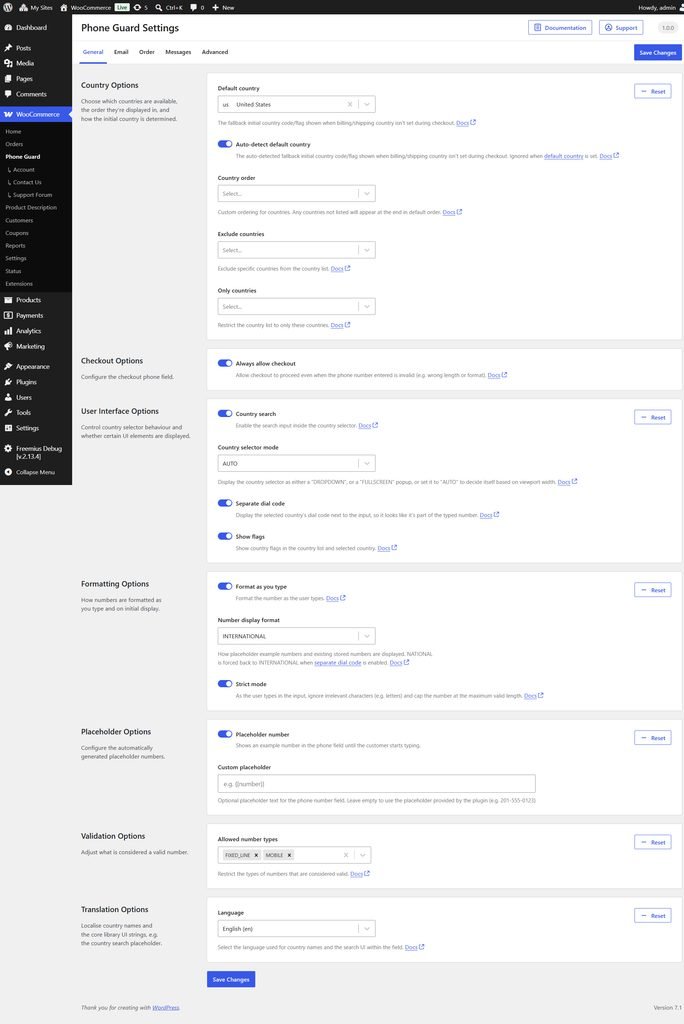
Country Options
- Default Country: Set the default country (empty = auto-detect via geo-IP)
- Auto-detect default country (Pro): Enable geo-IP lookup for initial country (disabled without a premium license)
- Country Order: Customize the order of countries in the dropdown
- Exclude Countries: Remove specific countries from the selector
- Only Countries: Restrict the selector to specific countries only
Checkout Options
- Always Allow Checkout: Let customers complete orders even with invalid phone numbers (invalid numbers are still logged)
User Interface Options
- Country Search: Enable search in the country dropdown
- Country Selector Mode: AUTO, FORCE_DROPDOWN, or DIAL_CODE_ONLY
- Separate Dial Code: Show dial code separately from the number input
- Show Flags: Display country flags in the selector
Formatting Options
- Format As You Type: Live formatting while typing
- Number Display Format: INTERNATIONAL, NATIONAL, or E.164
- Strict Mode: Strict validation (valid numbers only)
Placeholder Options
- Placeholder Number: Shows an example number in the phone field until the customer starts typing.
- Custom Placeholder: Custom placeholder text for the phone input
Validation Options
- Allowed Number Types: Select which phone types to accept (Fixed Line, Mobile, Toll Free, Premium Rate, Shared Cost, VoIP, Personal Number, Pager, UAN, Voicemail)
Translation Options
- Language: Select the language used for country names and the search UI within the field.
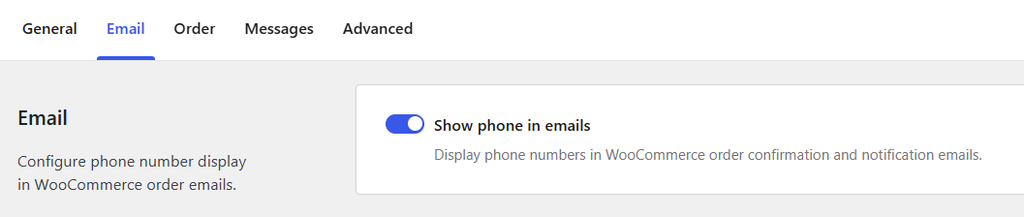
- Show Phone in Emails (Pro): Display phone numbers in WooCommerce order emails with Call/WhatsApp/SMS links for admins
Admin Orders
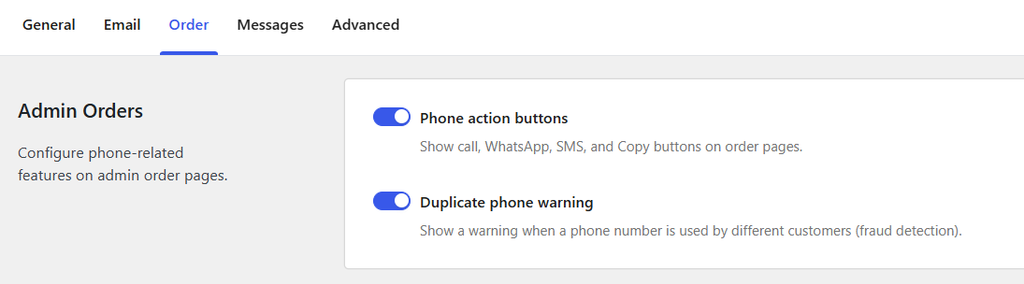
- Phone Action Buttons (Pro): Show Call, WhatsApp, SMS, and Copy buttons on order pages
- Duplicate Phone Warning (Pro): Show warning when a phone number appears on other customers’ orders
Error Messages
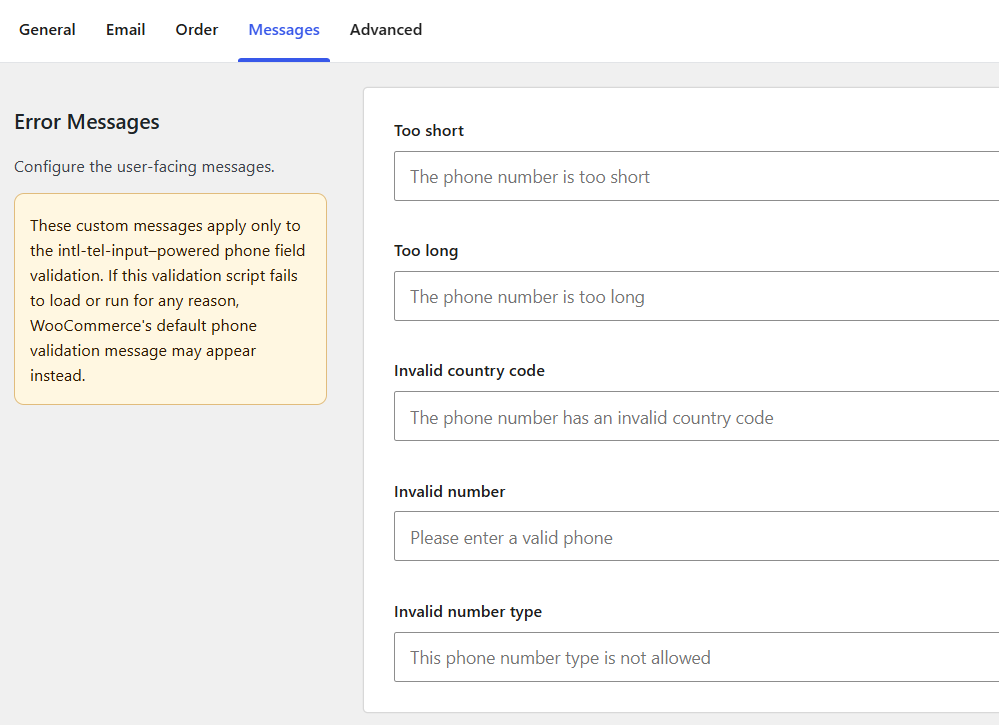
Customize validation error messages:
- Too short
- Too long
- Invalid country code
- Invalid number
- Invalid number type
Advanced
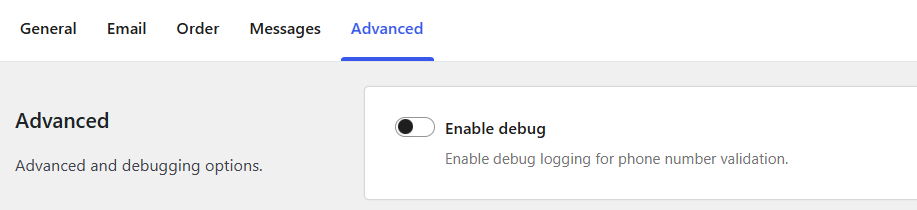
- Enable Debug: Enable debug logging to WooCommerce Status > Logs
Usage
Frontend Validation
The plugin automatically validates phone numbers on:
- Block-based Checkout (WooCommerce Checkout block)
- My Account > Edit Address page
The validation uses Google’s libphonenumber library via giggsey/libphonenumber-for-php for server-side validation and intl-tel-input for client-side validation. At checkout, server-side validation runs through the WooCommerce Store API (woocommerce_store_api_checkout_update_order_from_request) so the same rules apply on the backend.

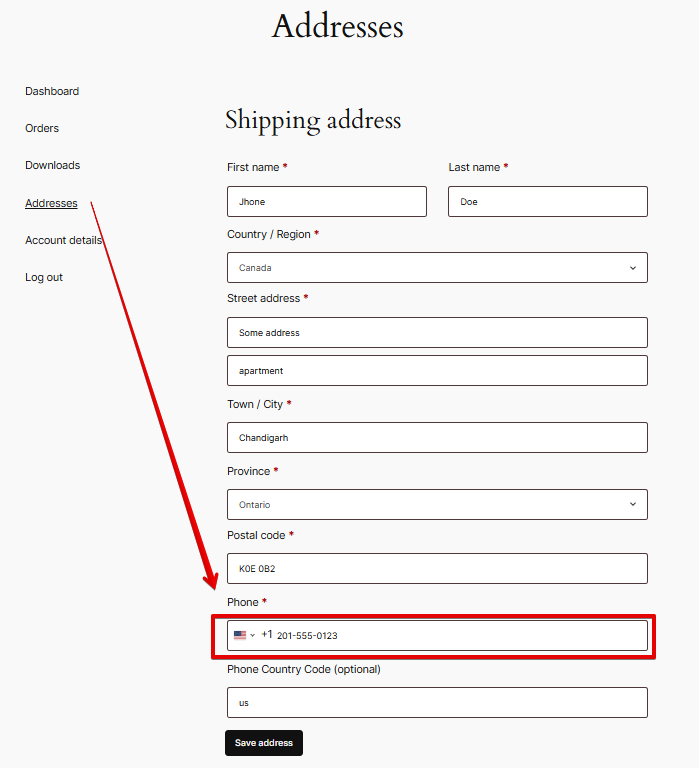
Admin Order Management
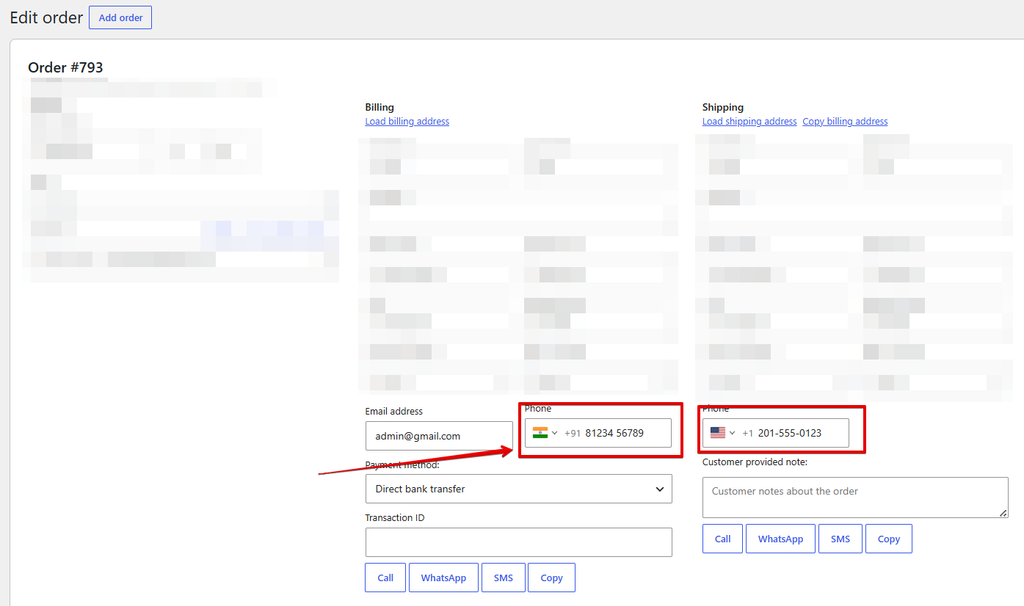
When editing an order in admin:
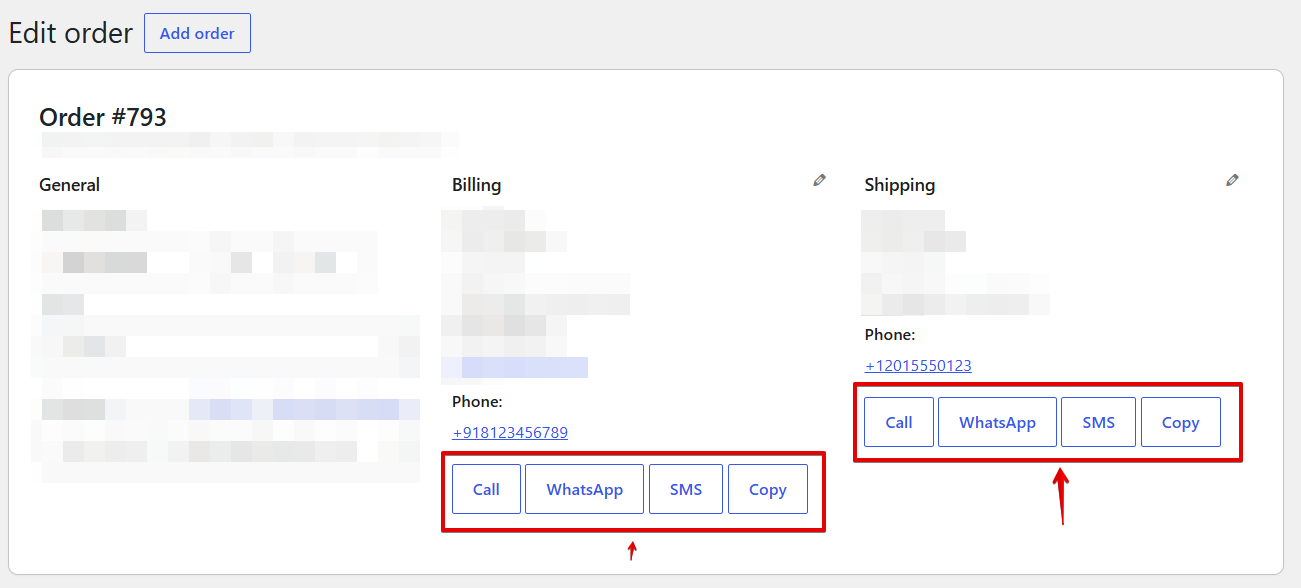
- Phone Display: Numbers shown with dial codes (E.164 format for display)
- Action Buttons (Pro): Call, WhatsApp, SMS, Copy buttons under billing/shipping addresses
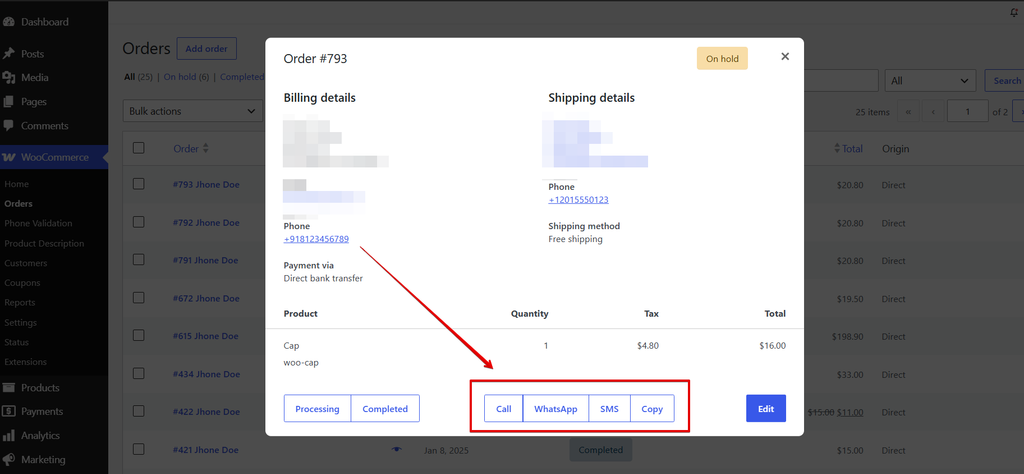
- Order Preview Modal (Pro): Same action buttons in the order preview
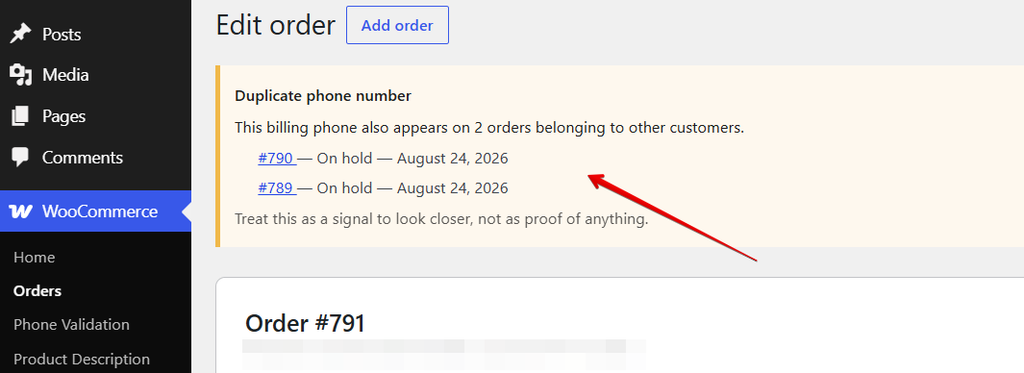
- Duplicate Warning (Pro): Alert if billing phone appears on other customers’ orders (last year, up to 20 results)
Email Integration
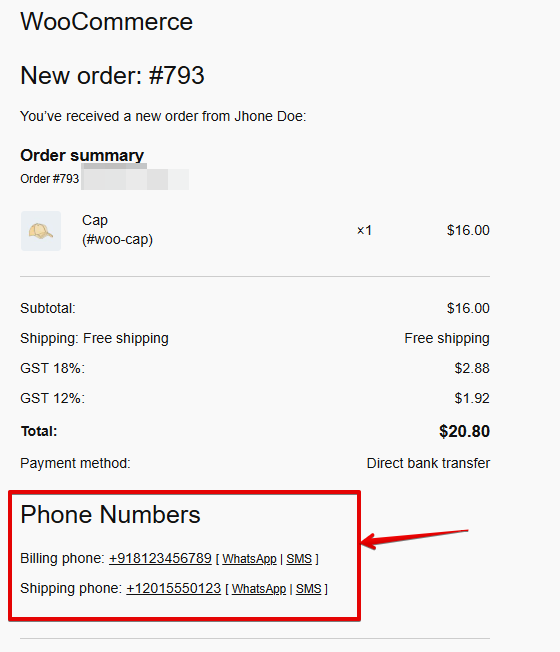
When enabled (Pro), order emails include a “Phone Numbers” section with:
- Billing phone (with tel: link)
- Shipping phone (if different from billing)
- WhatsApp and SMS links for admin emails
User Profile
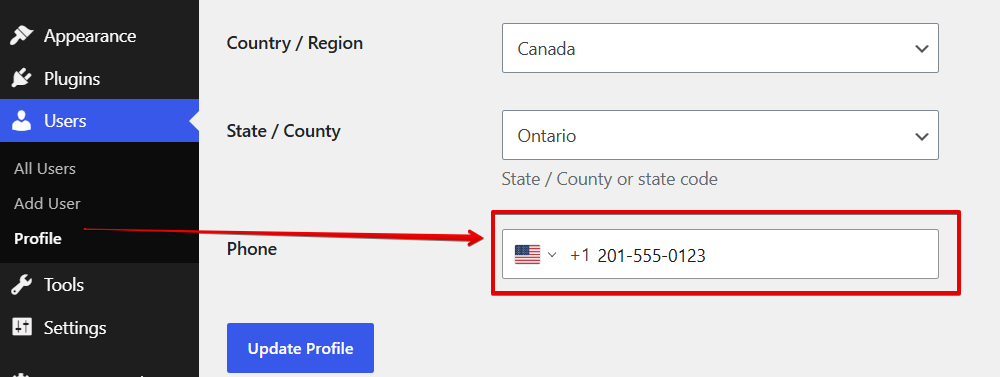
On WordPress user profile and edit user screens in admin:
- Phone validation for billing and shipping phone fields
- Numbers saved in E.164 format
Developer Documentation
Filters & Actions
Filters
hulk_woo_ipv_settings– Modify settings array before usehulk_woo_ipv_display_phone– Modify displayed phone numberhulk_woo_ipv_phone_e164– Modify E.164 number before storagehulk_woo_ipv_duplicate_phone_query_args– Modify duplicate search query argshulk_woo_ipv_phone_error_messages– Modify default error messages
Actions
hulk_woo_ipv_init– Fires after all controllers initializedhulk_woo_ipv_fs_loaded– Fires after the Freemius SDK is initialized (infreemius.php)
REST API
Endpoint: POST /wp-json/hulk_woo_ipv/v1/settings
Saves all settings. Requires manage_options capability.
Database
Single option: hulk_woo_ipv_settings (serialized array)
No custom tables. Uses WooCommerce order/customer meta for phone numbers. User-specific admin notices use keyed transients: hulk_woo_ipv_order_notice_{user_id} and hulk_woo_ipv_profile_notice_{user_id}.
Hooks Reference
Action Hooks
| Hook | Description |
|---|---|
hulk_woo_ipv_init | Fired after plugin initialization |
hulk_woo_ipv_fs_loaded | Fired after the Freemius SDK is initialized |
Filter Hooks
| Filter | Parameters | Description |
|---|---|---|
hulk_woo_ipv_settings | $settings | Modify merged settings |
hulk_woo_ipv_display_phone | $result, $original, $country | Modify displayed phone |
hulk_woo_ipv_phone_e164 | $e164, $original, $country, $context | Modify E.164 before storage |
hulk_woo_ipv_duplicate_phone_query_args | $args, $order_id, $phone | Modify duplicate search query |
hulk_woo_ipv_phone_error_messages | $messages | Modify default error messages |
Troubleshooting
Phone Field Not Visible on Checkout
The plugin requires the WooCommerce Checkout block with the phone field enabled. If you see a warning:
- Edit the Checkout page
- Edit the Checkout block
- Enable the “Phone” field in block settings
Validation Not Working
- Ensure you’re using the block-based checkout (not classic shortcode)
- Check browser console for JavaScript errors
- Enable debug logging in settings
- Check WooCommerce > Status > Logs for
hulk-phone-guardsource
Duplicate Warning Not Appearing
- Ensure “Duplicate phone warning” is enabled in settings
- Check that orders are within the last year (default query limit)
- Verify the phone number matches exactly (including formatting)
Custom Error Messages Not Showing
- Verify messages are saved in settings
- Check that
hulk_woo_ipv_phone_error_messagesfilter isn’t overriding - Ensure the validation error code matches (
empty,invalid_country_code,too_short,too_long,invalid_number,invalid_type)
Pro Features Not Working / Locked
Several settings and features (Email phone block, Duplicate warning, Order action buttons, geo-IP Initial Country Lookup) are gated behind a premium license:
- Confirm a premium license is active via Hulk Phone Guard → Account / Freemius
- Check the settings page — locked options show a Pro badge/lock overlay
Performance
- Single database option for settings (cached)
- Phone validation uses optimized
libphonenumber-for-phplibrary - Duplicate check limited to 20 orders from last year (configurable via filter)
- Debug logging only writes when enabled
Compatibility
- WooCommerce: 8.0+ (block checkout required)
- WordPress: 6.2+
- PHP: 7.4+
- HPOS: Fully compatible
- Multisite: Supported
- Translation: WPML, Polylang compatible (settings page uses WP i18n)
External Services (Geo-IP)
The plugin uses client-side geo-IP lookup for initial country detection via:
- ipapi.co
- geojs.io
- ip.guide
- BigDataCloud.net
Data sent: User’s IP address. See readme.txt for full details and privacy policies.
Uninstall
Deactivating the plugin preserves settings. Uninstalling deletes the hulk_woo_ipv_settings option.